Showing posts with label iPhone. Show all posts

Saturday, July 27, 2013

How To Surf On The Net With Mtn BIS Plan On iPhone/iPad Using TunnelBear

Most of us have already familiar with DroidVpn, SandwishVPN and PD-Proxy, as what we are using to surf the net with Mtn Bis now on the Android Mobile Phones and PC. And almost every Android & PC users are now enjoying it. But most of the Apple phone users are seriously complaining that they are unable to browse with Mtn Bis, this made me busy with a lot of research and finally came across one powerful software (TunnelBear) for the Apple phone users to enjoy Mtn Bis on their phone just like an Android and PC users.

To balance this tutorial for iPhone users, I will urge you to fastened up your seat belt and stay glued to the next information that will follow because I’m about to embark you in an unknown journey; trust me, you will be safe.
Let me quickly introduce you to TunnelBear VPN is the world’s easiest to use consumer VPN software that securely “tunnels” your internet connection to locations around the world. TunnelBear can be used to protect your privacy, to bypass internet censorship made by some unscrupulous China hackers who now work with MTN in destabilizing our network. 

TunnelBear is a free app for iPhone/iPad  and Android mobile phone that gives you 500MB of free data each and every month.

How To Get TunnelBear
  1. Before you download, make sure you are running  iOS 5.0 and latter; Click here to download TunnelBear
  2. Run and install TunnelBear on your device
  3. Create your account here and sign in from your device
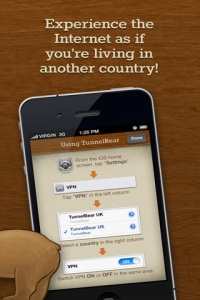
How To Set TunnelBear With BIS Plan
  1. Once you have successfully signed in from device,
  2. Go to Settings >> VPN >> Click On for VPN
  3. Make sure you Bis plan is actively connected
  4. Open your Safari Browser or any other browser and surf until you are tired.
That is it friends.
Note: You are only entitle to 500MB - 1.5GB per month free data as a free user, you can always upgrade for an unlimited account.

You Might Also Like: 
Feel free to Share/Like this post with your friends & many other useful tips are coming on your way, So, Subscribe Now, if you don't want to miss any of my future posts.

Saturday, July 13, 2013

Android and iPhone Users Now Enjoying Pinging with LiveProfile

It's a nice welcome development for the Android and iPhone Market. The android and iPhone Users can now Ping Just like the Blackberry Users, using an Application called "LiveProfile", With this Application you can exchange pins with your friends and family. Although this application has been in existence for a long time, it has now been improved and imbedded with BBM capabilities.

You will be given a unique pin you can exchange with friends and family. LiveProfile offers a cheaper, faster and more reliable alternative to text messaging allowing users to communicate with lightning-fast message delivery and confidence, indicating when messages are delivered, read, and even when the recipient is typing a response, making it feel closer to a live conversation. And, where text messaging charges can quickly rack up, LiveProfile is free, even for international use.

Features of LiveProfile

    1. Beautiful and easy to use interface
    2. Address book friend scans and invite
    3. Photo and Video sharing
    4. Emoticons
    5. Push notifications (no battery usage)
    6. Unique PINs
    7. Support for all major smart phones
    8. And more! 
      This application works well on Android, iPhone and BlackBerry. See what the application interface looks like below:

      How to Get LiveProfile Application
      • For Android user, go to the Android Market or Android Boutique (Google Store Play), Type or Search for "LiveProfile" and Hit the Install Button or click here to download LiveProfile Application directly.
      • For iPhone users, click here to download LiveProfile Application directly. 
      • For Blackberry users, click here to download LiveProfile Application directly but make sure you visit that url with your blackberry phone. 
      Download and Enjoy!

      Share your experience with this application via the comment box below and don't forget to share/like this post with your friends.

      Never miss any of my future post CLICK HERE TO SUBSCRIBE Once entered, you will have to check your Inbox for a confirmation email containing a confirmation link. Once you VERIFY your email by clicking on the confirmation link in the message, you will never miss any future articles.

      Monday, July 1, 2013

      Free Texting And Calling App For iPhones, iPad, iPod And Android Users - TextMe

      Hi guys, I want to quickly introduce you to an application that will blow your iPhones, iPad, iPod and Android devices.  Since Android and iPhones are gradually taking over the market, i don't know what Symbian and Java phones will become later.
      This application will allow you to make free calls over the internet, free text messages, get a free personal phone number etc. I will call this application auto refill, because the more you use it the more you refill the credit  either by watching video, downloading games or more application; therefore saving your pocket of buying credits online. In other words, the more you download, the more you earn credit for calling.
      Textme application is design for Android, Window phones,  iPhones, iPad and iPod alone. Blackberry and Symbian users are exceptionally exempted.

      How Can I Download Textme?
      » Visit iTunes store and search for Textme  for Iphone users.
      » Android users should visit Google play and search for Textme or you can download it from this link download TextMe.

      It is a 9ice application and i bet you are going to love it. Happy New Month Friends!

      Please do Share/Like this article to your friends and families and give us support by commenting.
      If you enjoyed this post and wish to be informed whenever a new post is published, then make sure you Subscribe to our regular Email Updates!