Showing posts with label Browsing Tips. Show all posts

Sunday, August 18, 2013

How To Get Free 6GB Worth Of Data Bundle On Your Airtel Sim

This tweak is similar to one of my recent post on How To Get Free 500MB Worth Of Data Plan On Your Airtel Sim, the tweak is tested and working fine before posted but the sad news about it is that you can only use Samsung Galaxy 2 Phone to get it done, you can borrow it from your friend and follow the below procedure to get free 6GB if you don't have Samsung Galaxy 2.

How to Get Started
  • Get a Samsung Galaxy 2 Phone, insert your Airtel SIM card
  • Scroll to the message and send s2 to 141
  • After you have sent the text, wait for a message that will confirm your 6gb!
  • Dial *141*712*0# to view your mb 
It is simple as that. Enjoy!

This free data bundle has been tested and it works perfectly. If it doesn’t work for you, don’t worry, wait for my next post.

Hope this information helps?
If it works for you, don't forget to comment here and remember to Click Share/Like buttons for the benefit of others.

If you enjoyed this post and wish to be informed whenever the new posts published, then make sure you Subscribe to our regular Email Updates!

Thursday, August 15, 2013

How To Get Free 500MB Worth Of Data Plan On Your Airtel Sim

Tonight I will be sharing with you on how you can get free 500mb on your Airtel Network. No much talk, Below is the detail.

How to Get Started
  • Get a Samsung Galaxy [be it tab or not], insert your Airtel SIM card
  • Send “SMART” [without quote & it must be in capital letter, as I wrote it] to “141
  • After you have sent the text, you will be notified that you have been given 500MB which valid for 12months
  • After 1 hour or more, remove the SIM card and insert it on your modem to start surfing the net with your free data bundle.
  • Dial *141*712*0# to view your mb
Note: It's 500mb and can only be activated on Samsumg Galaxy but can be browse using any Phone...
That's all. Enjoy!

This free data bundle has been tested and it works perfectly. If it doesn’t work for you, don’t worry, wait for my next post.

Hope this information helps?
If it works for you, don't forget to comment here and remember to Click Share/Like buttons for the benefit of others.

If you enjoyed this post and wish to be informed whenever the new posts published, then make sure you Subscribe to our regular Email Updates!

Update: Mtn free 3GB Is Not Finally Block, Browsing Fast & better than before

Few weeks ago I wrote a post on how to Get 3GB On Your MTN Sim For Free and am happy that a lot of people got it and enjoyed it before China Hacker blocked it, recently I made another post on how to Get Free 7.5 Gigabytes which was blocked too but I made this post to let you aware that the first tweak of  Free 3GB is not finally blocked. I just checked my Sim today and I discover that one of the Sim in which the free 3GB was activated is working back again; faster and better than before, just that it is not open Google Play on my Android. Could this be magic SIM?

If you succeeded in sending 100H to 131 and you are given Mtn Free 3GB but you thought it was blocked or you are unable to use it, just make sure you configure your APN like this;
Apn: web.gprs.mtnnigeria.net
Username: web
Password: web
And to those whose SIM 7.5GB was transferred to and you are sure you did not finish it before it was wiped, just try and browse with your SIM. Make sure you don’t send 2 to 131 at all if not it will be blocked.

I also learnt that Mtn is now working on some Android phone to limit the access to some restricted site.. I will update you the way out very soon.

It seems  the Mtn magic sim stuff is back too with 24hrs old method. You can give it a try with your old Sim of 128k, check the link below for more detail on how to activate it.
Hope this information helps?
If it works for you, don't forget to comment here and remember to Click Share/Like buttons for the benefit of others.

If you enjoyed this post and wish to be informed whenever a new post is published, then make sure you Subscribe to our regular Email Updates!

Sunday, August 11, 2013

Get Your Mtn Free 7.5 Gigabytes Now (Not Required Droping email any more)

I have no choice than to post this tweak here, i have closed the comment box in my previous post about Mtn 7.5GB, this decision was made in order to control spam on my blog and to listen to people comment on this tweak.
No much talk this morning, we all aware it, strait to the point.

Here is how it works
First of all you need to Register for the Data Gifting service:
  • Dial *131*2*1# or text REG to 131; you will receive a unique security PIN
  • You are required to change the system generated PIN to a new PIN they can easily remember by dialing*131*2*5# or by texting Change OLD_PIN NEW_PIN NEW_PIN to 131. E.g Change 0000 1234 to 131. Where 0000 is old PIN and 1234 is your new PIN.
Now How To Get Free 7 Gigabytes
Note that you need another Mtn number to transfer this 7GB to your number, after you have follow the above procedure on the number you wish to use for transfer this gigabytes to your number. 
Text key word "GIFT [Destination Number][Data Bundle Code][PIN] to 131. E.g Gift 0803xxxxxxxx 101 1234.
Where 101 is the code of 5GB + 2GB Bonus monthly plan and 1234 is your PIN"
Note: When try this code and you receive a message: Sorry, you do not have sufficient credit to perform this operation. Please recharge and try again.Thanks you! 
This simply means that the number you are transferring the Gigabytes to is not support and you need to get another number to do it.

For those people complain that 7.5Gb code is not working for them, try any of the below codes.
What you need to do is to replace 101 of 7.5Gb Code with any of below code.
  • 111 - 1.5Gb for 30days
  • 102 - 4.5 for 30days, Night(9PM-6AM)
  • 107 - 4.5 for 30days, Day(9AM-9PM)
  • 108 -  4.5 for 30days, Weekend (Fri9PM-Mon 6AM)
 E.g To transfer 1.5Gb Text key word "GIFT [Destination Number][Data Bundle Code][PIN] to 131. E.g Gift 0803xxxxxxxx 111 1234.
Where 111 is the code of 1.5GB monthly plan and 1234 is your PIN"

Use it why it last. The code is still working well up till the moment i made this post
 Note: The post may me remove on this blog any time.

Don't thank me....
Just make sure you share or like and tell your friends and families to always visit this site...

Never miss any of my future post CLICK HERE TO SUBSCRIBE Once entered, you will have to check your Inbox for a confirmation email containing a confirmation link. Once you VERIFY your email by clicking on the confirmation link in the message, you will never miss any future articles

Saturday, August 10, 2013

How To Get Unlimited Gigabytes On Mtn For Free + How To Transfer Up To 7GB To Another Mtn User

Few days ago i made a post on How To Get 3GB On Mtn Sim For Free which rock well before it get blocked but am happy to tell that we have dig out another one which is more superb than the previous one. With this new way of getting free Gigabytes, you can send up to 7GB to another Mtn Users, also with one Mtn Sim card you can transfer this Gigabytes to many Mtn line and the code is working fine with #0.00! balance.

It is time to enjoy what i have been enjoying for the past 7 days, i was not intended to drop this tweak this time around because it is what is really fetching lot of money into pocket of hackers now and nobody wish to reveal the secret for  free but i don't blame them because most of them spent a lot of money to get the tweak. Due to one of my recent post about  How To Get 3GB On Mtn Sim For Free which many people complain that is no more working while am still flexing with it, any way, i decide to drop this one to replace it for you guys. 

What Can I Do With The Mtn Free 7 Gigabytes?
  1. Browse and Download unlimited.
  2. It only last for one Month
  3. You can browse with it on PC/Tablet, Android, Apple phones, Symbian and Java Phones  with simple configuration.
How Can I Learn How To Get The Gigabytes?

There are series code for generating this Gigabytes but i decide to share you the best one among which  is How You Can Transfer Up To 7GB To Another Mtn User at once for free. 
Am sorry please, i don't intent to stress you but for security purpose, the code can't be drop here.

For the full detail on how to get it done; drop your email address through the comment form below and the detail will be forward to you as soon as possible.

Understand that the comment box will be closed as soon as we detect  that the code is no more working, when you came late and you met comment box closed please don't drop your email in another thread as you did last term when i posted the Glo Chocolate Tweak. This is because i hate send you the outdated information.

You Might Also Like:
Don't thank me....
Just make sure you share or like and tell your friends and families to always visit this site...

Never miss any of my future post CLICK HERE TO SUBSCRIBE Once entered, you will have to check your Inbox for a confirmation email containing a confirmation link. Once you VERIFY your email by clicking on the confirmation link in the message, you will never miss any future articles

Sunday, August 4, 2013

Mtn Free 3GB Is Still Working Sharp, Re-Activate Yours Now

Good morning my dear lovely viewers, yesterday lot of comment were made on one of my post "How To Get Free 3GB", people were complained that Mtn has finally blocked the tweak due to the message they received that "Your 100 hrs 30-Day Data Plan has expired" and thing truly stopped working but around 10pm yesterday one of my blog reader tega goddowell said: "it's stil wrking i jst ativate one of my sim nw thankz" and  i made the verification then i discovered that Mtn only succeeded in blocking the active plans of 3GB but the loophole is still intact and i quickly dialed the code on one of Mtn Sim like 5 times before i slept, i was surprised around 11:57pm yesterday, when i received a message like this: Welcome to 100 hrs 30-Day Data plan. Remember fair usage policy applies at 3.0GB.

This morning i have activated more than 5 Sim with quick response.
This is to let you know that the code is still working fine and response is not delay at all. If you received a message that your 100 hrs 30-Day Data Plan has  expired, just redial the code and you will receive another 3GB without much stress. We all know the code but for the new comer, here is the code below:
  • Just send 100H to 131 and you are good to go.
  • Wait till you receive a response that your 100 hrs 30-Data plan is activated.
  • If it doesn't work the first time you tried it, please calm down and send it like 5 times again. 
  • To check your MB data balance; send 2 in an SMS to 131 
You Might Also Like:
Don't thank me....
Just make sure you share or like and tell your friends and families to always visit this site...

Never miss any of my future post CLICK HERE TO SUBSCRIBE Once entered, you will have to check your Inbox for a confirmation email containing a confirmation link. Once you VERIFY your email by clicking on the confirmation link in the message, you will never miss any future articles

Wednesday, July 31, 2013

How To Get 3GB On Your MTN Sim For Free (Alternative To Magic Sim Activation)

I know most of us really enjoyed Mtn Magic Sim, now is very difficult to activate new one since China hacker help Nigeria Mtn tracked them down but am happy to bring another smile to your face guys. Here is another alternative to magic sim. This tweak will gives you 3GB data plan valid for good 30days and the nice part of it is that you can get it with #0.00!
The tweak requires a registered Mtn Sim. 0803, 0806, 0703, 0706, 0813, 0816, 0810 regardless of the type of Mtn Sim you use, you'll get your 3GB of data plan. Just make sure you do it sharp before it is detect by China hackers.

How To Do It
  • Just send 100H to 131 and you are good to go.
  • Wait till you receive a response like the one in the screenshot below:
  • If it doesn't work the first time you tried it, please calm down and send it like 5 times again.
    To check your MB data balance; send 2 in an SMS to 131
This tweak is tested working even with #0.00 as at the time of posting. Please use this tweak while it lasts meanwhile, note that the service is not intended and initiated by the service provider. Kind have in mind that they will block and stop it whenever they know of it.

Don't thank me....
Just make sure you share or like and tell your friends and families to always visit this site...

Never miss any of my future post CLICK HERE TO SUBSCRIBE Once entered, you will have to check your Inbox for a confirmation email containing a confirmation link. Once you VERIFY your email by clicking on the confirmation link in the message, you will never miss any future articles

Browse Unlimited Wtih Blackberry Plan On Your Android/Tablet Using GAE Proxy (Alternative To Droid VPN)

For those people that are still complaining about DroidVPN, here is another means to browse with Mtn Blackberry Subscriptions on your Android Mobile Phone with GAE Proxy Software & tablet users also include.

GAE Proxy is similar to DroidVPN, but a little bit different from DroidVPN. As it allows you to have access to free 10GB! unlimited browsing daily while DroidVPN allow you just 100MB daily. Please remember that this is not your ISP (Internet Service provider) so, you must have an active Blackberry Planbefore it will work for you. It works in all countries whose network is not buffeted and infected.
 
How To Use GAE Proxy To Browse With Blackberry Plan
  1. Visit Google play and search for GAE Proxy or download it here
  2. Run and install it on your Android/Tablet device
  3. Check Connect at boot
  4.   Enable Proxy Switch
  5. Make sure your Bis plan is active and well configured with the correct apn blackberry.net (If you are in Mozambique using Vodacom Network, your apn should be “internet”. Username and Password should be left empty).
  6. Connect and surf! till you are tired
If you enjoyed this post and wish to be informed whenever a new post is published, then make sure you Subscribe to our regular Email Updates

Monday, July 29, 2013

How To Enjoying Unlimited Browsing With Glo Line Using Chocolate

View of us will still remember the last term i posted Glo G-Bam tweak because we really enjoyed it, i confirmed then that Glo network is the best for browsing. Today am happy to tell you that we have discovered another means to browse free with Glo Network on your System.
This tutorial will tamper with your imagination because you are about to learn how to browse with #0.0 on your Glo line and how will you feel if you are able to browse with this Glo line free for life?
without much stories, let’s go straight to the point.

How Can I Browse Unlimited With My Glo Line?
  • Two software will be forward to you by me
  • Download it and unzip it to your desktop
  • All the settings will be attach to the software. 
  • Just follow the instruction accordingly and you are good to surf free with Glo line.
Requirements
You must have latest version of Java Runtime installed on your PC for this tweak to work.

Can It Work On Mobile Phone?
Currently, it doesn’t work on mobile phones except PC. Efforts are being put in place to make it work on phone too.

How Can I Get This Unlimited Browsing Tweak?
Glo network are very grace and we want this tweak to last longer.
Drop your email and I will inbox you the detail.

All thanks goes to Achmat Toffa. He is the brain behind it.

Monday, July 22, 2013

How To Get 240MB On Airtel Network With Just 200 Naira Valid For 1 Week

Let get started without wasting time.
  1. You must be on Airtel Club 10 padi's
  2. Dial *166# to migrate to Airtel Club Padi
  3. Recharge #250 on your Airtel SIM card
  4. Make sure you are given 15mb for 1week.
  5. Check your MB by Dialing *141*712*0# or *123*10#
Note: If you did not get the 15mb, then call any network for 1mins or less than check your MB again to make sure your 1week 15mb is ACTIVE.
  • Now send BBUD3 to 440 or dial *440*018#
  • You will be given 240MB!
  • Now dial *141*712*0# or *123*10# to check your MB
  • This Megabytes will last for 1week instead of 3days.
Never miss any of my future post CLICK HERE TO SUBSCRIBE Once entered, you will have to check your Inbox for a confirmation email containing a confirmation link. Once You VERIFY your email by clicking on the confirmation link in the message, you will never miss any future articles.

If you want to appreciate this, have Questions to ask or have anything to contribute, kindly use the comment form below. More so, Remember to use the "Share", "Like" and other Share buttons to share this post with your friends.

Saturday, July 20, 2013

How To Browse With Mtn Bis Plan On PC/Tablet With SandwishVPN

Recently I made a post which I titled "How To Enjoying Unlimited Browsing On PC/Tablet With MTN BIS Subscription Using PD-Proxy" few people testified to it that is working while a lot of people complain that is not working. This post was made as an alternate for the people that are still complaining about my previous post on the Mtn Bis Plan for PC. I won't feel happy when I heard that the money you used to subscribed is wasted, instead of leaving it to perish away, just try this method and I pray it works for you too.

It is not a new thing that you can use PD Proxy, sandwich, Vpn plus to unethically penetrate into the Mtn server as an invisible chairman to break loose your Subscribed Blackberry plan. We have been using them for the very long time, I just wonder when most of people still complain that they unable to use their Mtn blackberry plan with PD Proxy. Anyway, let me quickly introduce you to Sandwish Vpn.
SandwichVPN is a Virtual Private Network (VPN), a Tunneling Software. You can use it to surf the net anonymously and securely. It automatically hides your IP address. With this software, you can easily unblock restricted website.

How Can I Use It To Connect With My Mtn Bis Plan?
1.  Register  here and get a demo account, then Proceed to Download 

2.  Install it on your system and Run it as an administrator
3. Log in with your username and password, you used to sign up
 
Note: On Windows 7 users must execute the installer to run as administrator ( right click on the icon and choose run as administrator) On Windows xp users, DOT NET is needed before the SandwichVPN installation
  • During its first run it will ask for a driver install just press yes.
  • Input your username and password on its proper field.
  • Set proper protocol for your area and press connect.
  • Once it connects the software will minimize to system tray and is ready to use
Protocol:  UDP
Server: DEMO ( You can only use this server unless you upgrade to premium account).Make sure your modem is connected before you hit the SANDWISHVPN connect button.

You Might also Like: 
Hope this information helps?
If it works for you, don't forget to comment here and remember to Click Share/Like buttons for the benefit of others.
If you enjoyed this post and wish to be informed whenever a new post is published, then make sure you Subscribe to our regular Email Updates!

Friday, July 19, 2013

How To Enjoying Unlimited Browsing On PC/Tablet With MTN BIS Subscription Using PD-Proxy

Mtn has finally blocked the allowance of tethering "blackberry.net" on Bis. Which means you can't use your BIS Subscription on any other device like PC/Tablet, Modem, Nokia, iPhone & Android Devices.
For Some days now, different people keep comment/complaining that the Mtn Blackberry Subscription is no more working on Non Blackberry Devices..

Today, I can say it loud and clear that heavier internet users are browsing on their laptop using the Blackberry Subscription without the Network stops them.
Since Mtn has Stopped us from using their blackberry subscription to Surf on PC, Shelaf has done some research on alternate solution.. For real, PDproxy is seriously rocking for PC Users!

We all used blackberry.net with the Mtn Bis and few of us also used Ultrasoft, Freegate, Tor with the BIS Tweak before Mtn blocked it but now PDproxy on The Point.
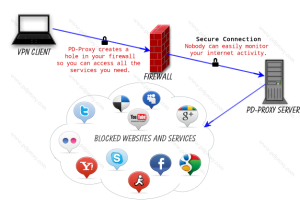
PD-proxy is the best; it is a fast and secure VPN service. It is one of the most affordable VPN service online.

To Use PDproxy With Mtn Blackberry Plans In Nigeria All You Need To Do Is:
  1. Subscribe for the blackberry Daily/Weekly/Monthly plan [Skip this if you have an active blackberry plan].
  2. Visit http://www.pdproxy.com/signup  to register a free account
  3. After that download PD-proxy software here
  4. Configure your modem thus; Apn - blackberry. net || Password/username: web
Configure Your PD-PROXY With Bellow Settings:
  1. After downloading the PDproxy Software, open the folder and install it.
  2. Launch the application and input your username and password you created.
  3. Choose any of the servers apart from the demo then select ICMP.
  4. Go to Setting then click Advance Settings
  5. Click on Proto Options & Type = 500
  6. Click Connect and You Are Good To Go!
Browser's Setting: 
Choose No proxy or Automatic. Depending on Browser because it runs every application that need internet connection!
For Firefox user choose: No proxy

NOTE: The free account is limited to 3Gig per month but the premium accounts are not limited in any way. You can easily upgrade your account through this link https://www.pdproxy.com/control-panel.htm?upgrade

You Might also Like: 
Hope this information helps?
If it works for you, don't forget to comment here and remember to Click Share/Like buttons for the benefit of others.
If you enjoyed this post and wish to be informed whenever a new post is published, then make sure you Subscribe to our regular Email Updates!

Saturday, July 13, 2013

Mtn Blackberry Subscription of #1000, Now Reduced to #800 (Bbc Promo)

Just this afternoon, a friend of mine confirmed the text message that was sent to me in the morning and it goes like this "Yello Surprise! Activate Blackberry monthly or weekly service and get 20% discount instantly. Offer valid till July 17th".
In other words, it means that you can now activate BBC one month plan for #800 instead of #1000. Very soon, we will get another text “that you can now activate BIS for #600” lol..!

I was just wondering what telecommunication will become by the year 2014. Because I don’t really know what MTN Nigeria is up to; but I still stick to my dream when Blackberry internet subscription will be #200 for complete a month. Earlier this year, Mtn and Etisalat reduced their Blackberry subscription price to #1,000 and #1,500 respectively.
This is just a bonanza that will expire by July 17th 2013. So if your Blackberry subscription expires within this period, count yourself lucky to opt into this bonanza scheme.

I believe you still remember that you can browse with it on your system without any interference.

To Activate This Plan
  • Just load your Mtn line with #800
  • Send BBC to 21600 and you are good to go.
Enjoy the offer while before it expires.

Never miss any of my future post CLICK HERE TO SUBSCRIBE Once entered, you will have to check your Inbox for a confirmation email containing a confirmation link. Once you VERIFY your email by clicking on the confirmation link in the message, you will never miss any future articles.

If you want to appreciate this, have Questions to ask or have anything to contribute, kindly use the comment form below. More so, Remember to use the "Share", "Like" and other Share buttons to share this post with your friends.

Thursday, July 11, 2013

How To Get Airtel 165MB With One Week Validity Period

With this little procedure your Airtel daily blackberry subscription will extend for one week. Two options will be involved because the 165MB i posted earlier doesn't support every Sim but you may try the 80MB code because it works on all sim...

Here's How:

  1. Buy two Airtel recharge card of #100 then load a #100 recharge card on your Airtel Sim 
  2. Then send BBUM2 or BBUD to 440.
  3. Wait until you get replies back from Airtel that your blackberry subscription codes has been successful.
  4. Send STOPAUTORENEW to 440
  5. Recharge your Airtel SIM with #100 again and wait for Airtel to give free 15mb for using #200 in a week.
  6. Dial *141*712*0# or *123*10# to check your Megabytes balance and expiring date.
NOTE: You must be on club 10 padi's. To migrate to club 10 padi's simply dial *166#.
Enjoy! 

Never miss any of my future post CLICK HERE TO SUBSCRIBE Once entered, you will have to check your Inbox for a confirmation email containing a confirmation link. Once you VERIFY your email by clicking on the confirmation link in the message, you will never miss any future articles.

If you want to appreciate this, have Questions to ask or have anything to contribute, kindly use the comment form below. More so, Remember to use the "Share", "Like" and other Share buttons to share this post with your friends.

Wednesday, July 10, 2013

How To Activate Your Etisalat Sim & Browse Free For Complete A Year

Hi dear lovely viewers, this is an exclusive for Etisalat users to enjoy free browsing for complete a year. This is so different to Magic Sim or things of sort. This is just a Bonus by Etisalat gives to their Subscribers!
If you heard the news then you could remember, when Tecno Launched their Tecno P3 Android Device, they partnered with Etisalat...
Without wasting much of time, below is the step to follow:

You don't need to spend any dime! You only need the two things:
  1. An Etisalat Sim
  2. A Tecno P3 Mobile Device
Steps Involved
No much steps are involved in this. You wont have to switch off your phone and keep your Sim for 8 or 24 Hours as MTN Magic Sim. Just simple steps are required here.
  1. Put your Etisalat Sim into your Tecno P3 Mobile Phone
  2. Goto your Phone message and write High then send it to 8186
  3. Dial *228# to check your megabytes and you have successfully activated your Etisalat free browsing.
Note: You will be given only 100mb Per Month. But guess what? Its Unlimited!!!
A subscriber gets the offer free with no conditions for the first month and need to recharge up to N1000 airtime monthly to keep getting the offer for the remaining 11 months. 
Also, You will be using it for complete 12Months i.e One Year from the day you activated it.
Importantly, You can activate as many sims as possible!
Give your testimony and Share/Like this post with your friends and loved ones.

Never miss any of my future post CLICK HERE TO SUBSCRIBE Once entered, you will have to check your Inbox for a confirmation email containing a confirmation link. Once you VERIFY your email by clicking on the confirmation link in the message, you will never miss any future articles.

Tuesday, July 9, 2013

How To Get Airtel 6GB Data Bundle & Browse For 2 Months

This tweak is working perfectly on PC and all phones but the problem is, the money involved.
This tweak exclusive to heavy internet users and not for every body purpose.

How To Get 6GB On Airtel To Browse For 2 Month
  • Make sure you have up to N3,000 airtime on you line
  • Then Send BBUM3 to 440 and start Flexing!!!
  • Dial *141*712*0# or *123*10# to check your data bundle balance.
Note: Your Gigabytes will last long for 60 days [2 Months] and make sure that you have tp to N3,000 airtime on your phone & Don't forget that it would be deducted..

No special setting required, just insert that sim to your modem or phone, connect with normal Airtel setting you are using before and you are good to go.
Enjoy!

Never miss any of my future post CLICK HERE TO SUBSCRIBE Once entered, you will have to check your Inbox for a confirmation email containing a confirmation link. Once you VERIFY your email by clicking on the confirmation link in the message, you will never miss any future articles.

If you want to appreciate this, have Questions to ask or have anything to contribute, kindly use the comment form below. More so, Remember use the "Share", "Like" and other Share buttons to share this post with your friends.

Friday, July 5, 2013

3 Different Sure Methods To Reactivate Mtn Magic Sim [Magic Sim Is Back & Hot]

Today am going to share you three different sure method to reactivate your Magic Sim, just make sure that when doing that, you do not have 10Mb at your disposal. You can always transfer money from another Mtn line to avoid the 10mb stuff. Below are still the normal procedure because I activated 2 Sims for my people yesterday.

Note: If you used your Magic Sim for the Mtn free calls I posted last term, am sorry to tell you that you have to get another line to do your Magic Sim afresh, because it will not work on it. Mtn intentionally released that free calls to divert our attention to Super Saver Plan and track down all our free browsing, but don't blame me for that because i stated in the post that you should not use your Mtn Free Browsing Magic Sim for it.

Now Straight To The Main concern Of The Topic.
Method 1: To Reactivate Magic Sim:
  • Remove Mtn Magic Sim that is no more working from the Phone and keep it for 12 hours
  • Put it back after 12 hours 
  • Send RESET to 131  [make sure you don't have up to #250 on your account before sending the code]
If you receive a message that: Dear customer, your 2 hrs 1-Day Data plan is still active.
Congrat! your line is reactivated, you can then continue enjoy your free browsing again.
But if you receive a message that: Sorry, you do not have sufficient credit to perform this operation.
You have to load money on your line and follow one of the below methods.

Method 2: To Reactivate Or Activate New Magic Sim - 1 Hour Old Method Still Working: 
  • Load #400 recharge card on your line
  • Send BBDay to 21600. Wait till you get the BB subscription message that it is active
  • Send 2H to 131  to activate the 2 Hours plan
  • Once the 2 Hours Plan is activated, and you confirm it
  • Remove your SIM and keep it for 1Hour
  • After the 1 hour, insert your SIM back to your device and start browsing.
Mind you, once you send 2H to 131, you may not receive any notification that your 2 Hours plan is active but your money will be deducted. Just proceed with the next procedure.

 Method 3: To Reactivate Or Activate New Magic Sim - 8 Hours Method
  • Load #250 recharge card on your line
  • Send 2H to 131,  after that send 106 to 131
  • Remove your Sim from your phone and keep it for 8 Hours 
  • At exact 8 Hours insert your Sim back and start surfing and download for free
Guys that is it. No long story.
Like I said earlier  that in the game of Magic SIM, risk is involved. If you can't risk it, don’t try it.
So easy and simple but risky.
Am sure one must work for you out of the three methods. God luck! 

Don’t forget to always use the comment box to ask your questions and you will receive answers immediately. Also Feel free to Share/Like this post with your friend & family.
If you enjoyed this post and wish to be informed whenever a new post is published, then make sure you Subscribe to our regular Email Updates!

How To Get Airtel 4GB Data Bundle For #1500 With Validity Of 2 Months

Few days ago, Airtel lunched new blackberry data plan of #1500 and it was officially said by Airtel that is unlimited but unfortunately we discovered that it is just 2GB caped. But am happy to tell that there is a way to get 4Gb with that same #1500 and it will last for a good two months, this is not a tweak, so be rest assure that will not be blocked till his validity period. It is purely from Airtel to blackberry users, but as we all know, Airtel blackberry plans works on all Phones and PC.
But the was part of it is that it is not all Airtel lines will be able to accept this subscription, to verify either your line will be among of beneficiary just follow the below procedure:
  • Before you load credit of #1500 to your phone for this subscription 
  • Just dial *440*161#
  • You will receive  a message of Insufficient balance, which means you are eligible for the offer
  • Proceed with loading #1500 to your account and follow the below procedure to get 4gb 
  • But if you dial the code and you receive a message that you are not eligible for this offer, don't load the money on it because it will not work on it. 
After you have confirmed that your line is eligible, here are the procedure to get 4gb for 2 months:
  • Load your Airtel line with #1,500 airtime.
  • Then dial *440*161#
  • You'll be credited with 4.2GB data bundle valid for 60 days. 
  • Dial *141*712*0# or *123*10# to check your data bundle balance.
No special setting required, just insert that sim to your modem or phone, connect with normal Airtel setting you are using before and you are good to go.
Enjoy!

Never miss any of my future post CLICK HERE TO SUBSCRIBE Once entered, you will have to check your Inbox for a confirmation email containing a confirmation link. Once you VERIFY your email by clicking on the confirmation link in the message, you will never miss any future articles.

If you want to appreciate this, have Questions to ask or have anything to contribute, kindly use the comment form below. More so, Remember use the "Share", "Like" and other Share buttons to share this post with your friends.

Wednesday, July 3, 2013

How to Get Airtel 165mb for Just #100

Few days ago, I shared a post on How to Get Airtel 80mb For Just #100, but today i must tell you that we have fund another cheap-less one, with that same #100 you can now get 165mb and is working on PC and other non blackberry devices. Are you still subscribing to 10mb for #100 then you are missing a lot, just use the below simple cod to get 165mb for just #100.
How to Get Started
  • Load #100 Airtime to your Airtel Line,
  • Go to message and send BBUM2 to 440
  • Your Airtel credit will be deducted and you will be credited with 165mb data bundle 
  • Dial *123*10# or *141*712*0# to check your mb.
Note: This 165mb data bundle only valid for 3days.
Enjoy!
 
Hope this information helps?
If it works for you, don't forget to comment here and remember to Click Share/Like buttons for the benefit of others.
If you enjoyed this post and wish to be informed whenever a new post is published, then make sure you Subscribe to our regular Email Updates!

Tuesday, July 2, 2013

Mtn Unlimited Free Browsing Mordered [Magic Sim Rest in Peace]

It look like MTN has started tracking down Magic Sim; I received lot of calls since yesterday and my inbox was flooded with mails of the Magic sim stuff not going again. A friend of mine who activated his own about a month ago lamented bitterly how Mtn wipe all his money today without any genuine explanation why they did that. Another pal of mine who activated his own barely 7months ago also lamented that his 32k sim was unable to browse throughout today.

 
 It look like MTN recently employed a China Hacker to track all free browsing sim in Nigeria. And
virtually all 32k Sims seems to have stop working. Now, the guy has already started with 64K sims and 128k sims. When he finally completes his job we will know what will become of Mtn Magic sim.
Meanwhile, my Magic Sim is still working fine without any interruption. I will therefore urge all  those whose sim is still browsing freely  to download all they can download this night before the China hacker will get to your domain.
One thing I know is that this is not the end of Mtn Magic sim. Loophole will continue to exist in all telecommunication system. Don’t worry guys, I will always update you about the latest info on Magic Sim. Just let be patient till China Hacker finished his work, then we will find another alternative.
Magic Sim Rest in Peace!

Never miss any of my future post CLICK HERE TO SUBSCRIBE Once entered, you will have to check your Inbox for a confirmation email containing a confirmation link. Once you VERIFY your email by clicking on the confirmation link in the message, you will never miss any future articles